

Cara Install Ekstensi Chrome
- Klik tombol "Add to Chrome" di atas.
- Anda akan diarahkan ke Chrome Web Store.
- Klik "Add to Chrome" pada halaman ekstensi.
- Konfirmasi dengan klik "Add Extension" pada popup.
- Ekstensi akan otomatis terpasang dan ikon muncul di toolbar.
- Klik ikon ekstensi di toolbar untuk mulai menggunakan.
Screenshot
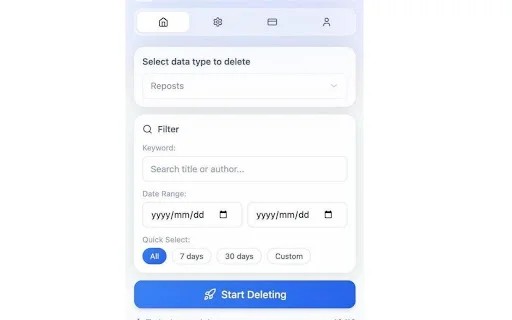
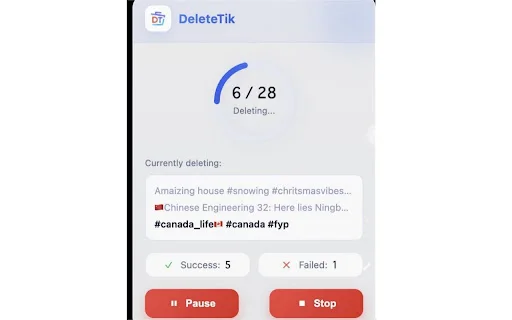
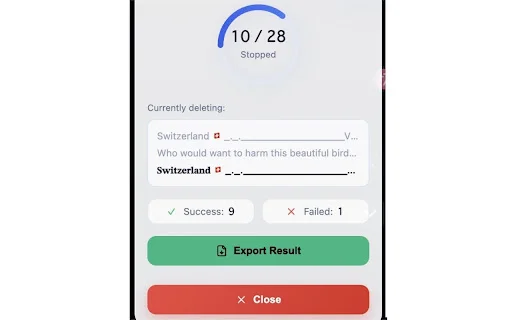
Is your TikTok profile feeling cluttered with years of accidental reposts, outdated liked videos, and saved favorites? Managing your digital footprint on TikTok can be a daunting task, especially when you have thousands of items to sort through manually. DeleteTik is the ultimate Chrome extension designed to help you regain control over your account, allowing you to clean your profile in seconds without the headache of manual deletion.
For active creators and casual users alike, DeleteTik offers a seamless, privacy-focused solution. Whether you are looking to declutter your favorites list, remove embarrassing reposts, or mass delete your own uploaded content, our tool provides a safe and efficient way to refresh your TikTok presence. Join thousands of users who trust DeleteTik to keep their accounts organized and private.
Key Features
- Bulk Repost Remover: Remove all reposted videos from your TikTok profile instantly.
- Mass Like Deletion: Clear your entire like history with a single click.
- Favorites Cleaner: Easily wipe out saved videos and collections.
- Batch Video Deletion: Delete your own posted videos in large quantities.
- Advanced Filtering: Sort by keywords, date ranges, or specific content types.
- Smart Safety Engine: Uses human-like delays to prevent shadowbans and action blocks.
- 100% Privacy: Runs locally in your browser; no password or cloud storage required.
- Data Export: Export your video list to CSV or JSON for backup before deletion.
How to Use
- Install the DeleteTik extension from the Chrome Web Store and pin it to your browser toolbar.
- Open TikTok in your browser and log in to your account.
- Open the DeleteTik dashboard and select the category you wish to clean (e.g., Reposts, Likes, or Favorites).
- Apply your desired filters, review the selected items, and click the “Delete” button to start the bulk removal process.
FAQ
Does DeleteTik require my TikTok password?
No, DeleteTik runs locally in your browser and never asks for or stores your TikTok password.
Is it safe to use for my account?
Yes, our Safety-First API Guard uses human-like delays to simulate natural behavior and minimize the risk of action blocks.
Can I undo a deletion?
Since deletions are processed directly on TikTok’s servers, they cannot be undone. We recommend exporting your data first.
Does it work on mobile?
DeleteTik is a Chrome extension designed for desktop browsers.
Why is there a limit on deletions?
To protect your account from TikTok’s anti-spam mechanisms, we implement recommended rate limits.
Ready to clean up your TikTok profile? Experience the fastest and safest way to manage your content. Download DeleteTik today and enjoy a fresh start!
Users appreciate the helpful customer support, though some have noted limitations regarding the number of items that can be deleted at once.
Kelebihan
- Responsive customer support
- Effective at fixing specific functional issues
Kekurangan
- Strict deletion limits
- Functionality issues requiring support intervention
Ulasan Pengguna
When I payed for this to remove favourites but the option when even available and when I contacted customer support they were very good and fixed the issue very quickly!!!
Scanned 12.7k vids just to have a limit of 10 thats bs
| ID Ekstensi | klnoeldpejhjnbgbjnnegmilcnhhcnjf |
|---|---|
| Version | 2.5.0 |
| Size | 0.3 MB |
| Developer | https://deletetik.com |
| Terakhir Diperbarui | |
| Tanggal Rilis | |
| Jumlah Pengguna | 1.000++ |
| Jumlah Ulasan | 2 |
| Chrome Store Ranking | #32104 |
| Category | Productivity |
| Tipe | Free |
| Status | Featured Extension |

PB Safe ডাউনলোড করুন – পাসওয়ার্ড, নোটস ও ফাইল এনক্রিপশন টুল
HoldToRun

Tr@mite ডাউনলোড করুন – আপনার ফোন থেকে সরকারি কাজ সম্পন্ন করুন
CQe-Solutions

Fontel Luce e gas ডাউনলোড করুন – আপনার এনার্জি প্রোফাইল পরিচালনা করুন
Fontel
DiskNova ডাউনলোড করুন – দ্রুত ফাইল ডাউনলোডার ও স্টোরেজ ম্যানেজার
disknova llc

Notion Empty Trash ডাউনলোড করুন – Notion ট্র্যাশ দ্রুত পরিষ্কার করুন
tobyxdd

Steadfast Courier অ্যাপ ডাউনলোড করুন – দ্রুত হোম ডেলিভারি সেবা
Zavisoft